
Mobile browsers make it easy to explore a candy-themed slot without installing a separate game application. Before opening the game, however, it helps to understand how the layout, account connection, controls and operator settings work on a phone. This guide explains what Canadian adults should check when browsing for the sweet bonanza slot, while keeping the focus on practical mobile use rather than general casino promotion.
What should you check before opening the game?
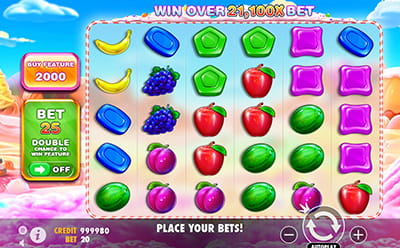
Start by confirming that you are viewing the original 6×5 version rather than a similarly named follow-up title. The standard game uses 30 positions and pays when at least eight matching symbols appear anywhere on the grid. It does not rely on traditional fixed paylines. This distinction matters on a small screen because the winning pattern is based on the total number of matching symbols, not a line that must be traced from left to right.
Next, read the information panel provided by the website hosting the game. It should identify the applicable RTP, stake range, symbol payments and available features for that specific configuration. Published figures can vary between versions, so a general figure found elsewhere should not be treated as the setting on the loaded game. The same applies to maximum win information, which can differ slightly between configurations.
Also check whether the page is a normal mobile browser version, a casino application or a demonstration mode. A demo may use virtual credits and may not reflect every account control offered during real-money play. The game itself does not manage registration, identity checks or payments. Those matters belong to the operator whose website displays the game, so its terms should be read separately before any account activity.
How does the layout behave on a phone?
The mobile version is built with HTML5, allowing the game to scale to modern Android and iOS browsers. The grid, tumble system, Scatter symbol and Free Spins feature remain part of the same game structure, although buttons may be rearranged for touch controls. A stable connection and an up-to-date browser can help prevent interrupted loading, but technical performance still depends on the device, browser and operator website.
Use landscape mode only if it makes the symbols and information panel easier to read. Portrait mode is often more convenient for one-handed browsing, while landscape mode may give the grid more horizontal space. Before spinning, locate the stake selector, information button, sound controls and game-history option. Knowing where these controls are reduces the chance of changing a setting accidentally while trying to inspect the rules.
Mobile browsing does not create a separate game account. A real-money session normally connects to the hosting casino account, balance and available history. If the site offers an operator app, that app belongs to the operator rather than the slot provider. For general mobile safety practices, readers can consult the Canadian Centre for Cyber Security, especially when deciding whether a website, download or connection appears trustworthy.

Which features affect what happens after a win?
The central mechanic is the Tumble feature. When a qualifying combination wins, those symbols disappear, the remaining symbols fall into the empty spaces and new symbols enter from above. Additional combinations can form during the same paid spin. The sequence continues until the new grid produces no further qualifying win, so one spin can contain several separate winning events.
Four or more lollipop Scatters trigger the Free Spins feature and normally begin with 10 spins. Three or more additional Scatters during the feature add five spins. During Free Spins, multiplier bombs can appear with values from 2x to 100x. Bombs remain in place until the current tumble sequence ends, after which their values are added together and applied to that sequence’s tumble win.
These features can be easy to misunderstand on a small display because several events may happen before the final result appears. Wait until the tumble animation and multiplier calculation finish before judging the outcome. A promotional free-spin offer from an operator is separate from the built-in Free Spins round. Any wagering, expiry or maximum-bet conditions attached to a promotion come from the operator, not from the game’s standard rules.
When do optional settings change the experience?
Some mobile versions show an Ante Bet or Double Chance-style setting. In the documented configuration, increasing the stake by 25% doubles the chance of triggering Free Spins naturally by adding more Scatter symbols to the reels. This does not guarantee a feature or a profit. It also disables the Free Spins purchase option, so activating one setting can remove another choice.
Where the operator and local rules permit it, Bonus Buy may offer the 10-spin round for 100 times the selected base bet. Availability is not universal, and the price may be hidden or disabled on some websites. Treat this as a high-cost optional feature rather than a normal route through the game. Check the on-screen information before selecting it, particularly when using a narrow touchscreen.
Autoplay may also be available, but it deserves careful attention on mobile. Depending on the implementation, it can include stop conditions linked to a win, a feature trigger, a balance increase or decrease, or a selected result amount. These controls differ by operator and jurisdiction. If you choose to use autoplay, review every stop condition first and keep the session short enough to monitor comfortably.
What belongs to the operator rather than the game?
The slot does not process deposits, withdrawals or account verification. The operator determines which currencies, payment methods, account checks, limits and transaction procedures are available. A Canadian-facing website might support certain local options, but geography alone does not establish that a particular method, account type or feature will be available to every player.
The same separation applies to login recovery, two-factor authentication, locked accounts, personal-data changes and customer support. If a mobile session fails to load, a balance appears incorrect or an account becomes inaccessible, contact the hosting operator rather than the game developer. Game history may be visible inside the interface, while longer transaction and session records depend on the operator’s own systems.
Before browsing with real money, confirm the operator’s age, identity, provincial and account requirements. Read any promotional terms independently, including wagering conditions and expiry dates. It is also sensible to check which deposit, loss, session, cooling-off and self-exclusion controls are available. These are operator-level protections, not universal features of the game, and their form can vary between websites.
Mobile browsing questions answered
Does the mobile version require a separate application?
Not usually. The HTML5 version can normally open in a modern Android or iOS browser, and a separate application is not required by the game itself. If a casino supplies an app, it is the operator’s app, with its own download, account and security conditions.
Is the same game available on desktop and mobile?
The core rules should remain the same when the operator serves the same configuration: a 6×5 grid, Tumbles, Scatters and Free Spins multipliers. Screen layout and controls can change, however. Always read the information panel on the device being used because settings may differ between operators or versions.
Can a demo session confirm the game’s expected results?
No. A demo session uses virtual credits and can help familiarise you with controls and the tumble sequence, but short play cannot verify RTP, volatility or future outcomes. For the applicable details, rely on the loaded game’s information screen and the operator’s stated terms rather than a brief test.